
Meshmixer and Blender are two of the most popular tools used in 3D-printing workflows, but they serve very different purposes. Meshmixer focuses on STL repair, hollowing, Boolean operations, and print preparation, while Blender is a complete 3D creation suite designed for modeling, sculpting, rendering, animation, and advanced mesh editing.
Many users compare these tools because both can edit STL and OBJ files, repair meshes, and prepare models for 3D printing. However, the workflow experience, learning curve, performance, and feature depth are very different.
This guide compares Meshmixer vs Blender based on:
- STL repair
- resin printing
- sculpting
- performance
- Boolean operations
- ease of use
- hollowing workflows
- beginner friendliness
- mesh editing
- print preparation
What Is Meshmixer?
Meshmixer is a lightweight mesh-editing tool originally developed by Autodesk. It is widely used for:
- STL repair
- hollowing resin models
- tree support generation
- mesh cleanup
- Boolean operations
- polygon reduction
- print preparation
Many hobbyists and resin users prefer Meshmixer because it is:
- beginner-friendly
- fast for repairs
- lightweight
- easy to learn
- optimized for mesh workflows
Unlike Blender, Meshmixer focuses mostly on direct mesh editing instead of full 3D content creation.
What Is Blender?
Blender is a professional open-source 3D software suite used for:
- 3D modeling
- sculpting
- animation
- rendering
- simulations
- video editing
- texture painting
- geometry nodes
It supports:
- STL files
- OBJ files
- CAD conversion workflows
- advanced modifiers
- procedural workflows
Blender is far more powerful overall, but it also has a steeper learning curve than Meshmixer.
Meshmixer vs Blender — Quick Comparison
| Feature | Meshmixer | Blender |
|---|---|---|
| Main Purpose | STL repair & print prep | Full 3D creation suite |
| Ease of Use | Beginner-friendly | Steeper learning curve |
| STL Repair | Excellent | Good with add-ons |
| Sculpting | Basic to moderate | Advanced |
| Rendering | Very limited | Professional quality |
| Hollowing | Excellent for resin | Possible but more complex |
| Performance | Lightweight | Heavier software |
| Animation | No | Yes |
| Support Generation | Built-in tree supports | Requires additional workflow |
| Price | Free | Free |
STL Repair Comparison
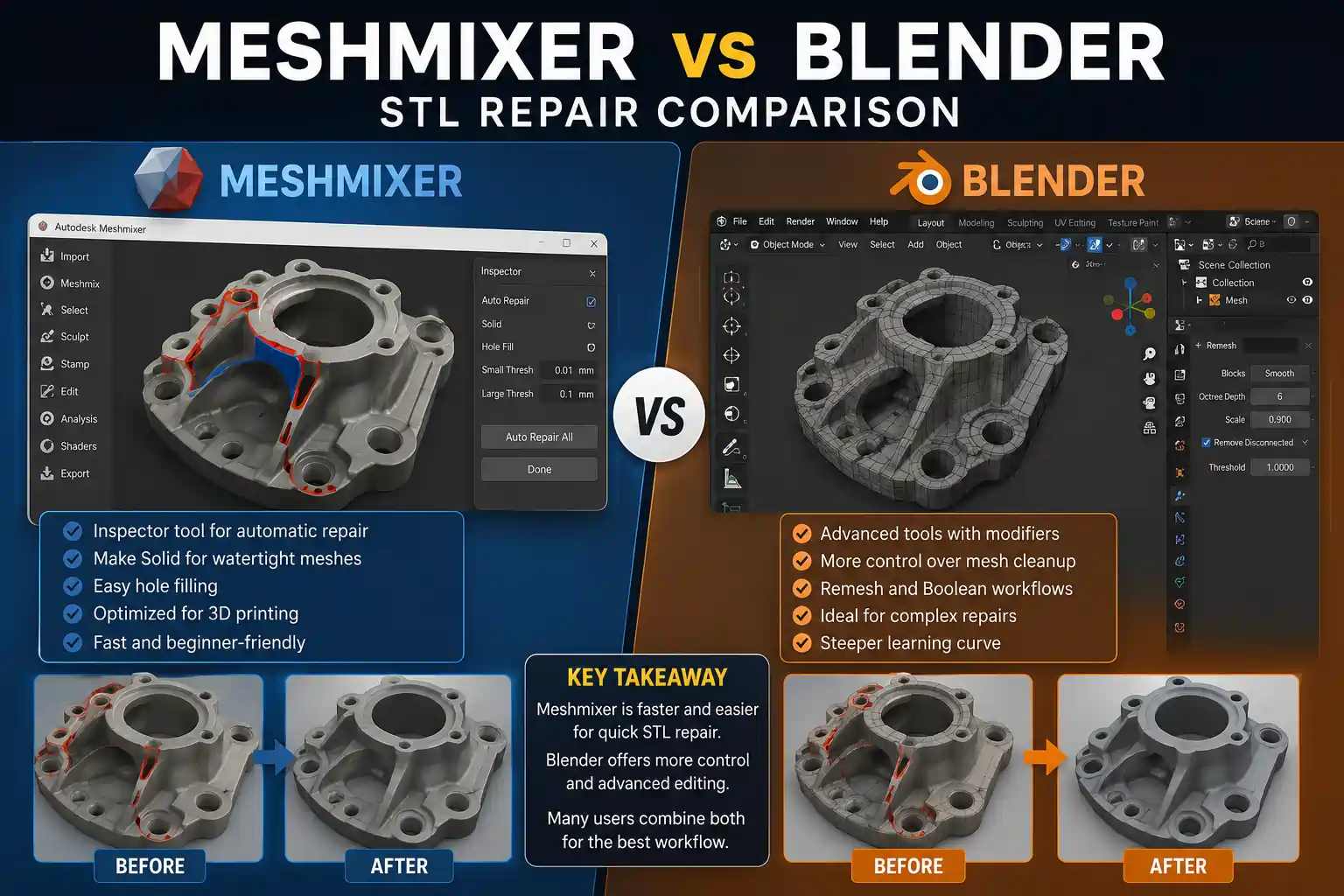
Meshmixer for STL Repair
Meshmixer is widely considered one of the easiest tools for repairing damaged STL files.
It includes:
- Inspector tool
- Make Solid workflow
- adaptive remeshing
- polygon reduction
- shell separation
- automatic repair tools
These features help repair:
- non-manifold geometry
- holes
- broken scans
- disconnected shells
- failed Boolean meshes
The workflow is extremely beginner-friendly.
If you want a detailed repair workflow, follow this complete Meshmixer stl files repair guide.
Blender for STL Repair
Blender can also repair STL files, but the workflow is more technical.
Users often rely on:
- 3D Print Toolbox
- remesh modifiers
- Boolean modifiers
- sculpt tools
- geometry cleanup tools
Blender offers more control overall, but it requires more experience.
For quick STL repair:
- Meshmixer is usually faster
- Blender is more flexible
Sculpting Comparison
Meshmixer includes:
- Inflate brush
- Smooth brush
- Drag brush
- Flatten brush
- adaptive remeshing
These tools work well for:
- miniatures
- surface cleanup
- organic adjustments
- scan repair
However, sculpting features are still limited compared to Blender.
Blender includes professional sculpting tools such as:
- dynamic topology
- multiresolution sculpting
- advanced brushes
- masking
- voxel remeshing
Blender is significantly better for:
- character creation
- organic sculpting
- creature design
- hard-surface detailing
Resin Printing & Hollowing
Meshmixer remains extremely popular among resin users because it includes:
- hollowing tools
- drain-hole placement
- tree supports
- wall-thickness workflows
- mesh repair
Many users still use Meshmixer as the repair stage before slicing.
A common workflow is:
- Repair STL
- Hollow model
- Add drain holes
- Export STL
- Generate supports
You can also follow this complete guide on hollowing resin models in Meshmixer.
Blender supports resin workflows, but the process is more advanced.
Users often rely on:
- Boolean modifiers
- solidify modifier
- remeshing
- external slicers
Boolean Operations Comparison
Meshmixer makes Boolean operations simple.
Users can quickly:
- merge objects
- cut holes
- split meshes
- customize STL models
The interface is optimized for fast print-preparation workflows.
Blender’s Boolean system is more advanced and flexible.
However:
- failed Booleans are more common
- topology cleanup is sometimes required
- beginners may struggle with modifiers
Performance & Hardware Requirements
Meshmixer is:
- lightweight
- fast to install
- less demanding on hardware
It performs well even on older systems.
However, some users experience:
- OpenGL issues
- startup crashes
- GPU compatibility problems
If the software keeps crashing, follow this troubleshooting guide: Meshmixer Not Opening? Fix Crashes & Startup Issues
Blender is significantly heavier than Meshmixer.
Large scenes may require:
- stronger GPUs
- more RAM
- better CPUs
Which Is Better for Beginners?
For beginners:
- Meshmixer is easier
- Blender is more powerful
Most new users can learn Meshmixer in a few hours because the interface focuses mainly on repair and print preparation.
When to Use Both Together
Many advanced users combine both tools.
A common workflow is:
- Model or sculpt in Blender
- Export STL
- Repair in Meshmixer
- Hollow the model
- Generate supports
- Slice and print
This combines Blender’s modeling power with Meshmixer’s repair speed.
Best Use Cases
Use Meshmixer If You Need:
- fast STL repair
- resin hollowing
- support generation
- quick print preparation
- lightweight software
- beginner-friendly workflow
Use Blender If You Need:
- advanced sculpting
- rendering
- animation
- full 3D modeling
- procedural workflows
- high-detail artistic control
Frequently Asked Questions
Is Blender better than Meshmixer?
Blender is more powerful overall, but Meshmixer is usually faster and easier for STL repair and resin-print preparation.
Is Meshmixer easier than Blender?
Yes. Meshmixer is significantly easier for beginners because it focuses mainly on mesh repair and print workflows.
Which software is better for STL repair?
Meshmixer is generally better for fast STL repair, while Blender offers more advanced editing control.
Can Blender replace Meshmixer?
Partially. Blender can perform many similar tasks, but Meshmixer is still faster for quick repair and hollowing workflows.
Which is better for resin printing?
Meshmixer is usually easier for resin hollowing and support workflows, while Blender is better for sculpting and model creation.
Do professionals still use Meshmixer?
Yes. Many hobbyists, engineers, dental labs, and resin users still use Meshmixer for repair and print preparation.
Conclusion
Meshmixer and Blender are both powerful tools, but they solve different problems. Meshmixer is faster and easier for STL repair, resin hollowing, and print preparation, while Blender is better for advanced modeling, sculpting, rendering, and artistic workflows. Many experienced users combine both together to create a complete 3D-printing pipeline. The best choice depends on whether you prioritize simplicity and repair speed or advanced creative control.